
Save Instagram Reels.
Keep them forever.

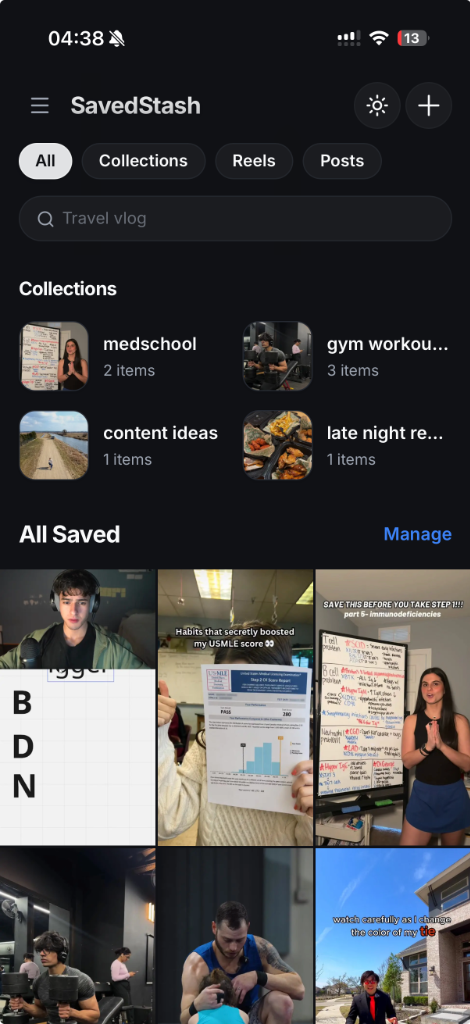
Your personal vault for Instagram Reels. No signup required, no Instagram login needed. Save links, organize into collections, and find any reel in under 3 seconds. The UI is simple and similar to Instagram's native saved interface - nothing new to learn. Works best on mobile devices.

Start SavedStash Free Learn More
SavedStash Mobile Feed UI
The Frustration

Instagram is a black hole for your inspiration.

Folders are hidden, search is broken, and bookmarked reels disappear without warning.

🗑️

Links Go Dead

When you save a Reel on Instagram, you don't own it. If the creator deletes the post or hides their account, your reference disappears from your collections forever.

🔍

Zero Keyword Search

Trying to find that one recipe, design trend, or marketing tip you saved last month? Good luck. Instagram makes you scroll through a giant grid of thumbnails with no way to search captions or hashtags.

🌀

The Distraction Trap

Instagram is engineered to hook you. Going cold turkey often backfires — the sudden withdrawal can leave you feeling disconnected and low. But opening the app to grab a single reel drags you right back into the scroll. You can't take a real break without losing your saved references.

The Solution

Your personal, permanent video vault.

SavedStash puts you back in control of your curated content.

SavedStash is a clean, mobile-first workspace designed to get you out of the social feed and into execution. It gives you a quiet, ad-free environment to study, cook, design, or create content using the Instagram Reels you already saved. Only links are stored - the reels are fetched and played directly from Instagram.

  • Instant Save: Copy a link from Instagram and save it to your vault in seconds. No Instagram login required.
  • Ultra-Fast Retrieval: Search by captions, tags, and uploader handles to find any reel in under 3 seconds.
  • Distraction-Free: Access your saved reels without opening Instagram (internet required — reels play from Instagram, not offline). No algorithms, no doomscrolling.
Launch SavedStash Free
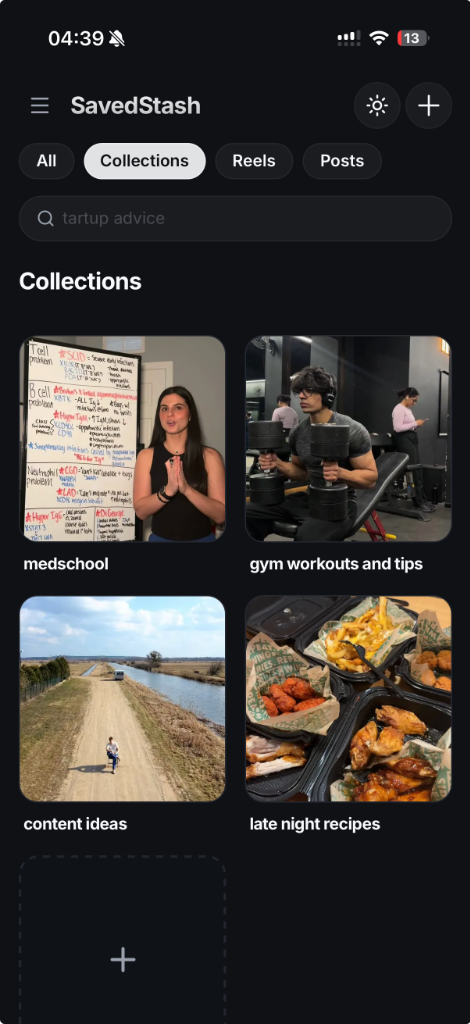
SavedStash Collections View UI
How It Works

Save reels in seconds. No Instagram login required.

Works on any mobile browser. No app store download needed.

1

Add SavedStash to your Home Screen

Open app.savedstash.com in your mobile browser, tap the share/settings menu and select "Add to Home Screen". It runs like a native app with no app store needed.

2

Save a reel - two ways

Android:

Find a reel in Instagram, tap Share, choose Share to, and select SavedStash.

iPhone (iOS):

Find a reel in Instagram, tap Copy Link, open SavedStash, and tap the "+" button to paste it.

3

Organize and find fast

Add reels to custom collections, search by keyword, and play them directly from your vault. Reels are fetched and played directly from Instagram.

Key Benefits

Built for creators, researchers, and curators.

Why professional curators choose SavedStash over Instagram bookmarks.

01

Find what you need in under 3 seconds

Our database organizes title, tags, uploader handles, and captions instantly. Stop scrolling endlessly to find that one video from weeks ago.

02

Keep references safe - even if deleted

Currently, if a creator deletes their reel, the link goes dead. This will be solved soon with video backup storage so your saved reels stay playable forever.

03

Digital detox without the crash

Quitting Instagram cold turkey often backfires — the withdrawal makes you feel low, and you end up right back in the feed. SavedStash lets you take a real break. Save your reels here, close Instagram, and access what you need without the algorithm-driven scroll. No feeds, no distractions, no crash.

04

Quit "productive procrastination" and execute

The problem is rarely a lack of knowledge - it's a lack of execution. Stop hoarding hundreds of tutorials that sit dead in your bookmarks. SavedStash turns your references into actionable guides so you build and execute today.

Features

Superpowers for your reel library.

Simple tools built to help you capture and organize Instagram Reels. Currently works with Instagram only.

Custom Collections

Organize your stashed reels into custom nested folders. Multi-select and batch-move items to curate references for specific clients or projects.

No Signup Required

Start stashing with one click. The free version requires no accounts, no email forms, and no signups. Only links are stored - no space taken on your phone.

Coming Soon

Bulk Instagram Import

Import all your previously saved Reels in bulk using your Instagram data export. No Instagram login required.

Coming Soon

YouTube & TikTok Import

Save individual YouTube and TikTok reels by pasting links. Bulk import from these platforms is not available yet.

Simple & Familiar UI

The interface is designed to feel just like Instagram's native saved section. Collections, search, and playback - everything where you expect it. Nothing new to learn.

Coming Soon

AI-Powered Collection Builder

Import your bulk Instagram export and just tell the AI what collections you want — "make folders for recipes, design inspo, and coding tutorials." It scans your reels and organizes them instantly. No manual sorting.

Coming Soon

Cloud Backup & Transcripts

All your saved reels are stored in the cloud with full transcripts — even if the creator deletes their video. Can't remember who posted it or what the caption said? Just search what you vaguely remember hearing in the reel. The transcript finds it.

Roadmap

Free forever. Premium features coming soon.

I'm currently working on building the future of SavedStash. Here's what's on the roadmap.

Free Plan

$0

Free Forever

  • ✓ Save unlimited Reels & Posts
  • ✓ No Instagram login required
  • ✓ Only links are stored - no space on your phone
  • ✓ Reels fetched and played directly from Instagram
  • ✓ Fuzzy keyword search by caption and tags
  • ✓ Custom collections & folders
FAQ

Frequently Asked Questions

Simple, straightforward answers. SavedStash currently works with Instagram only, no login required.

No. No Instagram login required. We never ask for your Instagram username or password. You simply copy a link from Instagram and paste it into SavedStash.

Yes. The problem with going cold turkey is that you lose access to your saved reels — so the moment you need a recipe or tutorial, you're pulled back into the feed and the scroll starts again. SavedStash breaks this cycle. Save your reels here, then close Instagram without fear of losing anything. Instead of scrolling shorts, open SavedStash to find exactly what you need (you'll still need an internet connection — reels play from Instagram, not offline). No algorithms, no doomscroll, no withdrawal crash.

Currently, SavedStash works with Instagram Reels only. YouTube and TikTok support are coming in future updates. When using the app, you save Instagram reel links, and the reels are fetched and played directly from Instagram.

Currently, if the creator deletes the post, the link will go dead since the reel is fetched directly from Instagram. This will be solved in an upcoming update with video backup storage, so your saved reels stay playable even if deleted from Instagram.

SavedStash is a mobile web app (PWA). You don't need to visit the App Store or Google Play Store. Just open the app URL in your mobile browser, open your browser's share or settings menu, and select 'Add to Home Screen'. It will run like a native app on your phone.

Android: Add SavedStash to your Home Screen, find a reel you want to save, tap Share, then Share to, and select SavedStash.

iPhone (iOS): Add SavedStash to your Home Screen, find a reel, copy the link, open SavedStash, and tap the "+" button to import it.

Bulk import is coming soon. You'll be able to import your previously saved Instagram Reels. No Instagram login required. YouTube and TikTok support will follow in future updates.

To find a saved reel on Instagram, open the Instagram app, navigate to your profile tab, tap the three-line menu button in the top right corner, and select Saved. Because Instagram has no search function for bookmarked Reels, finding a specific clip means scrolling indefinitely. SavedStash solves this by automatically indexing descriptions so you can find any saved reel in under 3 seconds.

To find a saved reel on Facebook, tap your menu icon, choose the Saved option (purple bookmark icon), and filter your list by 'Reels'. If you want to find saved reels in Facebook or Instagram without app jumping, you can copy the links into SavedStash to organize them in a single unified database.

To find saved draft reels on Instagram, go to your profile, tap the Reels tab (the clapboard icon), and open the Drafts folder. Note that draft reels are temporary and are deleted if you log out or reinstall the app. To preserve your creative ideas permanently, copy finished video links to SavedStash so they stay safe.

To find saved audio on Instagram, open your profile menu, choose Saved, and tap Audio. For Facebook, find saved reel audio in the Saved items menu under audio.

To find saved reel templates, open the Reels creation screen in the Instagram camera and choose the Templates tab, or navigate to your profile's Saved menu and tap Audio & Templates. To keep track of templates and layouts, organize your favorite reference reels in SavedStash folders sorted by editing structure.

It's a simple feature Instagram won't give you.

Instagram wants you to scroll, get distracted, and spend more time in their app. SavedStash is here to prevent that. A simple tool for a simple need: save, organize, and find your reels fast. No algorithms, no feeds, no distractions.

Open SavedStash Free Works best on mobile devices. Open in your phone browser.
Install SavedStash First, open app.savedstash.com in your browser Then tap Share & Add to Home Screen